
If Destiny 2 keeps crashing after the Edge of Fate update, especially on Xbox, there’s a fix that’s actually working.
Since the Edge of Fate update landed on July 15, Destiny 2 players have been running into a frustrating problem: the game keeps crashing. It doesn’t matter if you’re on Xbox, PlayStation, or PC; the reports are everywhere. And for a lot of folks, it’s making the game borderline unplayable.
The good news? Players have found a fix that actually works. And Bungie has finally acknowledged the issue and is working on more permanent updates. Here’s a quick breakdown of what’s going on and how to stop the crashes for now.

Destiny 2 Edge of Fate Game Crash
After the Edge of Fate update, a large number of Destiny 2 players started experiencing crashes across all platforms. The issue often begins with the game freezing during gameplay, then unfreezing briefly before forcefully closing and sending players back to the dashboard.
This seems to happen most frequently when playing with friends in fireteam activities, which has made group play frustrating or even impossible for some. On Xbox Series X and Xbox One X, the crashing is particularly severe, with players reporting that even reinstalling the game doesn’t solve the problem.
Over on PlayStation, PS4 users are seeing full crashes, specifically when trying to enter the Tower, while PS5 users are encountering strange audio bugs that appear to be linked to the crashes.
A few PC players have also mentioned similar issues, especially during campaign missions.
How to Fix Destiny 2 Game Crash Issue After Edge of Fate Update
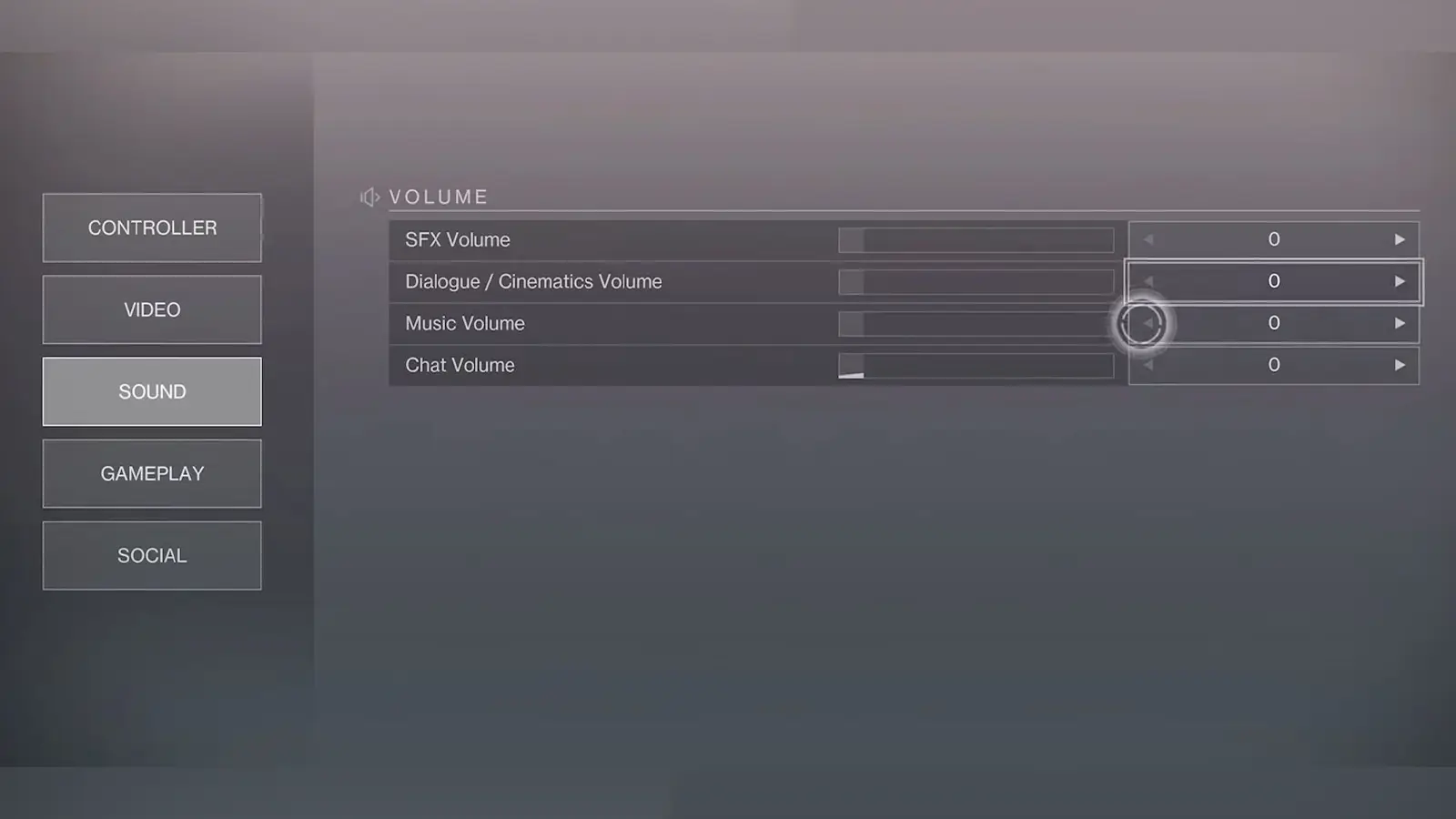
Surprisingly, one temporary fix that’s actually working for many Destiny 2 players is simply turning the SFX (sound effects) volume all the way down to zero in the game’s audio settings. While it may sound odd, this workaround has helped players avoid constant crashes after the Edge of Fate update, especially on Xbox and PlayStation consoles.
Several users have confirmed that after crashing multiple times, sometimes more than eight times in a single session, they were able to play crash-free just by lowering the SFX volume. Here’s how to do it:
- Go to Settings in Destiny 2.
- Navigate to the Sound tab.
- Turn SFX Volume all the way down to 0.
Bungie has confirmed that it is actively working on fixing the widespread crashing issues following the launch of Edge of Fate. According to the latest update, the dev team is targeting a patch before Saturday, July 19, that will include additional crash fixes specifically aimed at Xbox platforms, where the problem has been the most severe.
The developer also acknowledged that more crash-related issues remain under investigation. These include PlayStation 4 crashes when entering the Tower and audio-related bugs on PlayStation 5, which may be contributing to instability. There’s no exact timeline for those fixes yet.